Japan Pension Service · Employer payment guide
Pay-easy for employers’ social insurance contributions
Published by Japan Pension Service. HTML edition by Foreigners in Japan. This is an unofficial reproduction; the original PDF is authoritative.
Original PDF on nenkin.go.jp ↗About this publication: Foreigners in Japan
Paying your company’s social insurance contribution invoice without going to the bank? This leaflet shows where the three Pay-easy numbers are on the invoice and the steps for internet banking and Pay-easy ATMs.
Who this is for
For employers and payroll staff paying Japan Pension Service contribution invoices. The examples are for employer invoices, not National Pension payments by individuals.
What it covers
- Pay-easy payment numbers: find the numbers needed from your social insurance contribution invoice.
- Paying through internet banking or an ATM: follow the original illustrated payment steps.
- Checking your payment: read the notes on receipts, bank arrangements, payment limits and avoiding duplicate payments.
Helpful next steps
- Understand your employer contribution invoice
Check the invoice explanation in the workplace-payment guide. If you have already completed the payment, do not pay the same invoice again.
Official publication: original wording
Text from this illustration: Cover banner: To employer – To pay social insurance contributions – Pay-easy is convenient and easy, with the Pay-easy logo (E-payment via ATM and Internet), source page 1
To employer
To pay social insurance contributions
Pay-easy is convenient and easy
E-payment via ATM and Internet
Three merits of Pay-easy payments

Text from this illustration: Three merits of Pay-easy payments (cards), source page 1
Save trips to bank
Payment online from the comfort of home or your office
Service available 24/7
Payment anytime via internet or ATM
No payment fees
No fees charged in principle
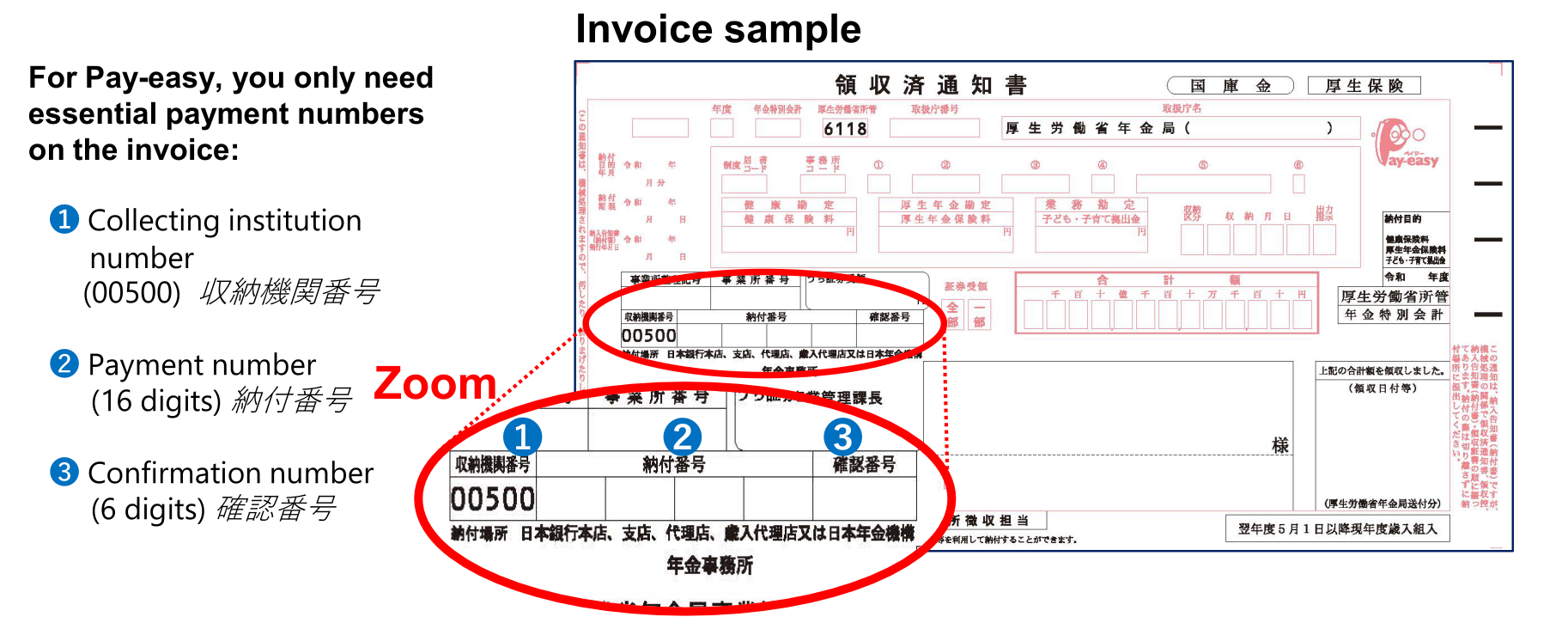
Text from this illustration: Annotated invoice and payment numbers, source page 1
For Pay-easy, you only need essential payment numbers on the invoice:
➊Collecting institution number (00500) 収納機関番号
❷Payment number (16 digits) 納付番号
❸Confirmation number (6 digits) 確認番号
Text printed on the invoice illustration
Invoice sample
Zoom
➊
❷
❸
For internet banking
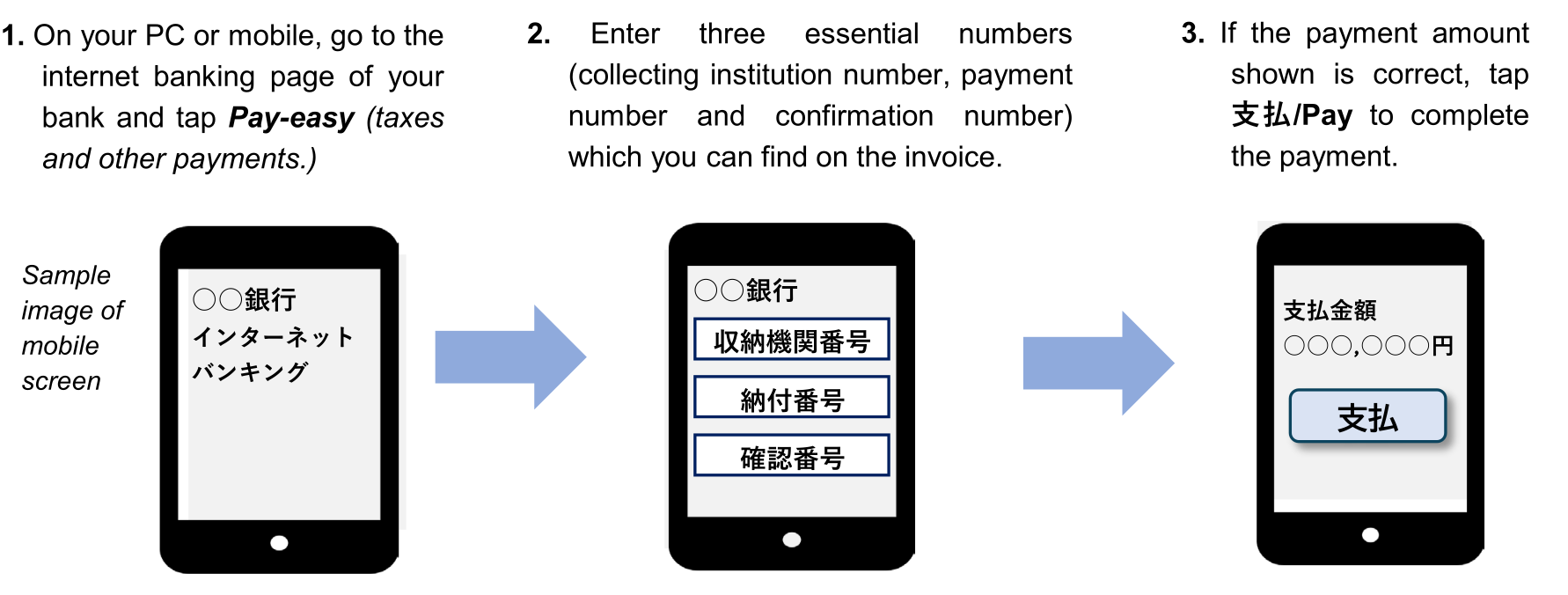
Text from this illustration: Internet banking payment steps, source page 1
1. On your PC or mobile, go to the internet banking page of your bank and tap Pay-easy (taxes and other payments.)
2. Enter three essential numbers (collecting institution number, payment number and confirmation number) which you can find on the invoice.
3. If the payment amount shown is correct, tap 支払/Pay to complete the payment.
Sample image of mobile screen
○○銀行インターネットバンキング
○○銀行
収納機関番号
納付番号
確認番号
○○銀行
支払金額
○○○,○○○円
支払
<Notes>
● Once you completed the Pay-easy payment, do not use the same invoice and pay again at bank.
● To use Pay-easy you need to have an Pay-easy arrangement with your bank in advance.
● With Pay-easy, paper receipts are not issued; if needed, print out the payment details.
For ATM with Pay-easy mark
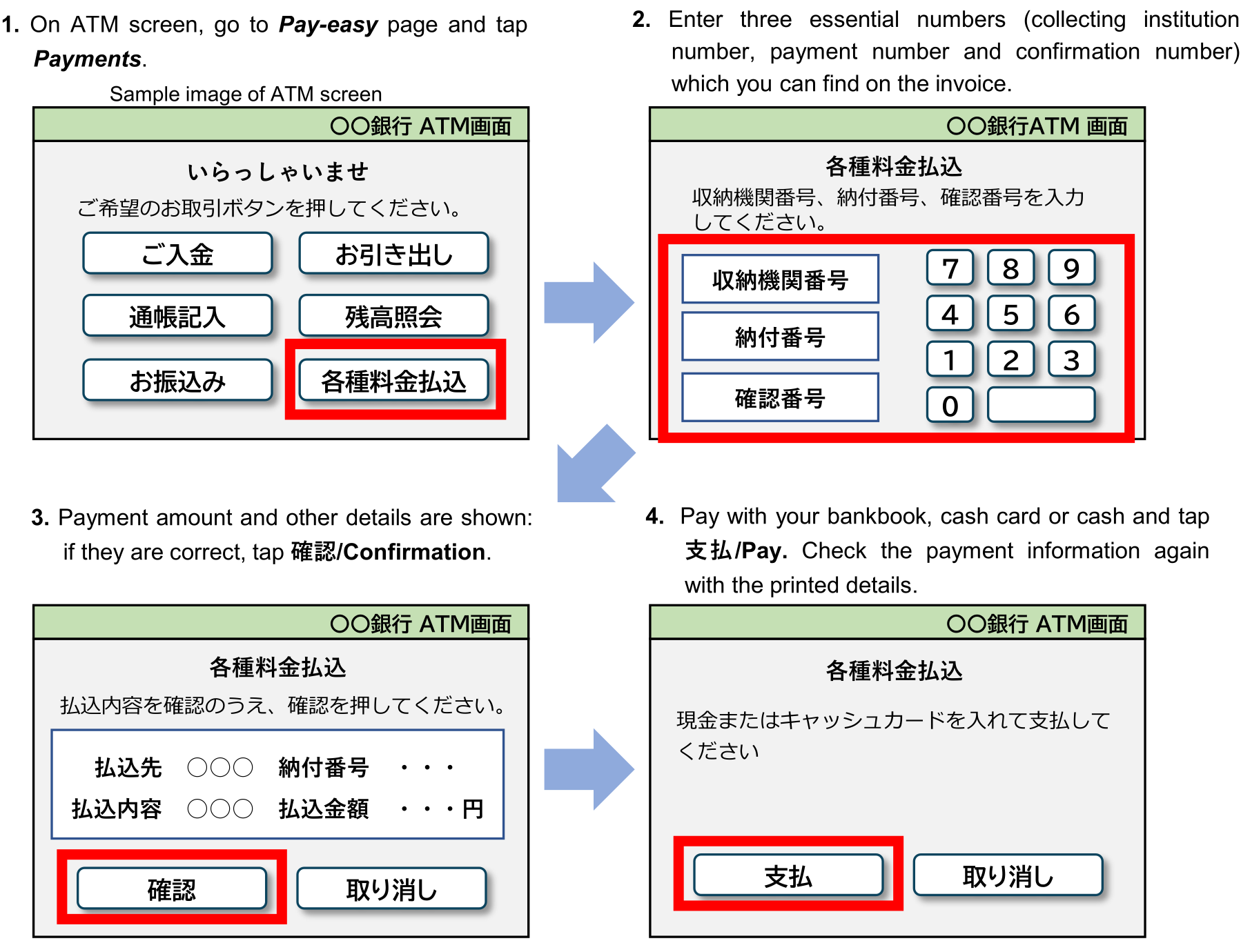
Text from this illustration: ATM payment steps, source page 2
Instructions
1. On ATM screen, go to Pay-easy page and tap Payments.
2. Enter three essential numbers (collecting institution number, payment number and confirmation number) which you can find on the invoice.
3. Payment amount and other details are shown: if they are correct, tap 確認/Confirmation.
4. Pay with your bankbook, cash card or cash and tap 支払/Pay. Check the payment information again with the printed details.
Text printed on the sample ATM screens
Sample image of ATM screen
〇〇銀行ATM画面
いらっしゃいませ
ご希望のお取引ボタンを押してください。
ご入金
お引き出し
通帳記入
残高照会
お振込み
各種料金払込
〇〇銀行ATM 画面
各種料金払込
収納機関番号、納付番号、確認番号を入力してください。
収納機関番号
納付番号
確認番号
7 8 9
4 5 6
1 2 3
0
〇〇銀行ATM画面
各種料金払込
払込内容を確認のうえ、確認を押してください。
払込先 ○○○ 納付番号・・・
払込内容 ○○○ 払込金額・・・円
確認
取り消し
〇〇銀行ATM画面
各種料金払込
現金またはキャッシュカードを入れて支払してください
支払
取り消し
<Notes>
● Once you completed Pay-easy payment, do not use the same invoice and pay again at bank.
● To make payments with bankbook or cash card, you need to have/open a bank account.
● With Pay-easy, paper receipts are not issued; if needed, keep the printed details.
FAQ
Q. How can I find an ATM with Pay-easy service?
A. Scan the code for JAMPA, enter bank name and look for the ATMs with Pay-easy service which fits your needs.
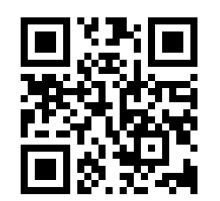
Website of JAMPA; Japan Multi-Payment Network Management Organization (in Japanese)
Q. Is there any limit of amount payable at an ATM?
A. It depends on the bank you use; please contact your bank to find the limit.
日本年金機構
Text from this illustration: 検索 (search) button with pointer, beside the 日本年金機構 search box, source page 2
検索
日本年金機構ホームページ https://www.nenkin.go.jp